Volutions - ID | News | Gadget | Tutorial | Freeware | Template | Etc.: quicklauncher
Showing posts with label quicklauncher. Show all posts

Kupfer v206 Released With Improved Runtime Memory Usage, PPA Now Available For Lucid Too

Kupfer

After finally getting themes support about 2 weeks ago, another Kupfer version (v206) was released today bringing a huge list of bug fixes and more importantly, reduced memory usage. The changelog says the Kupfer runtime memory should be reduced by 10-30% thanks to the reimplementation of icon cache.


You can check out all the bugs fixed in the latest Kupfer v206 @ kaizer.se.

With this release, there's also good news for Ubuntu 10.04 users: the latest Kupfer has finally been packaged for Ubuntu Lucid Lynx too so you can finally install it from the PPA (until today the PPA provided a very old Kupfer version for Lucid).

Add the Kupfer PPA and install the latest v206 in Ubuntu 10.04, 10.10 and 11.04 using the commands below:
sudo add-apt-repository ppa:kupfer-team/ppa
sudo apt-get update
sudo apt-get install kupfer

Tip: Kupfer comes with 2 extra themes - to change the theme, go to the Kupfer Preferences and on the Plugins tab enable the "Custom Theme" plugin, then select among the other 2 themes: dark or square. If you want to create your own theme, see HERE.

Kupfer (v205) Gets A New User Interface. Finally!

Kupfer is a quick launcher (like Gnome DO or Synapse) which comes with many very useful plugins but always lacked a nice user interface. Well, an update today finally brings some UI love for Kupfer. Check out the new Kupfer interface:

Kupfer 205


Further more, you can theme it however you want - see this page for info: http://kaizer.se/wiki/kupfer/GTKTheming.html


You can also select the icon style you want Kupfer to use: GTK+, Ascii or Unicode:

Kupfer

Kupfer


The icon set can be changed from the Kupfer Preferences (no, I don't know who the dude in the Kupfer Preferences window is):

Kupfer preferences


Besides the interface changes, there are some other new features in the latest Kupfer v205 worth mentioning:
  • Add context action "Set X as default action for object Y"
  • Implement a preedit widget for input methods, also resolving the incompatibility with ibus so it should fix the issues with non-English languages


Install Kupfer v205 in Ubuntu


Kupfer quicklauncher

Add the Kupfer PPA and install the latest v205 in Ubuntu Maverick and Natty using the commands below:
sudo add-apt-repository ppa:kupfer-team/ppa
sudo apt-get update
sudo apt-get install kupfer


Don't know how to use Kupfer? Check out its new HELP page and user manual. There's also a page with quick usage tips @ Gnome.org.

Synapse 0.2.2 Gets Relevancy Service, Three Plugins And More

Synapse 0.2.2

Synapse, the new awesome looking quick-launcher for Linux reached version 0.2.2 today, getting some of the features many of you have requested:
  • Most importantly, Synapse got a relevancy service - the applications you use the most will be on top of the search results (Zeitgeist is used for this).
  • Support for basic transliteration when searching for applications - therefore you shouldn't need to type accents (if your language has them)
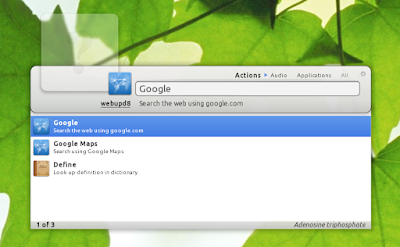
  • 3 new plugins: Open Search (search the web - it currently supports Google search and Google Maps), Locate (find files on your filesystem) and Gnome Screensaver (this was already available in the version in the PPA for some time).

Synapse google search
(Synapse 0.2.2 - Google Search plugin)

Other minor changes include: Shift+Enter executes the action without closing Synapse, custom gtkrc file (so now Synapse can be themed) and a notification area icon / appindicator which can be disabled (this was also already available in the PPA for some time).


Synapse plugins
(New plugins in Synapse 0.2.2)

Install Synapse 0.2.2 in Ubuntu


Add the Synapse PPA and install Synapse in Ubuntu using the following commands:
sudo add-apt-repository ppa:synapse-core/ppa
sudo apt-get update
sudo apt-get install synapse
If you've previously installed Synapse and you're only upgrading to the latest 0.2.2, restart Synapse to be able to use the new features.


Please note that the Maverick version says "0.2.1", that's an error in the version number, it's actually 0.2.2.

Remember, Synapse depends on the Zeitgeist dataproviders you use to display the results, so see our initial post for info on installing more Zeitgeist dataproviders and as well as THIS post for a Chrome plugin.


Dark synapse
(Dark Synapse theme using a light GTK theme)

If you're using a light theme and want to try Synapse using dark colors, download THIS file and copy it to your ~/.config/synapse folder, then restart Synapse.


For other Linux distributions downloads, bugs, suggestions and so on, visit Synapse @ Launchpad.


Info via mhr3
 
Support By Blogger