


The Parcellite (one of the best Linux clipboard managers) development stopped a while back and for a year there were no new versions. But Vladi pointed out in a comment that a new developer took over the project back in December and a new version has already been released: 0.9.3.
Changes in Parcellite 0.9.3 (released December 20, 2010):
- Fixed 100% CPU bug that occurs with certain clipboard data.
- Fixed list not staying at the top of the list.
- Added patch that corrects clipboard losing text data when app closes (Thanks, sarahstrong).
- Added more man page information.
As you can see, there are only bug fixes for now, but it seems Parcellite will also get new features soon:
I am still going through the bug reports, patches, and feature requests. Pending means I’m evaluating/testing/validating, and there’s a good chance it will make it into the next release.
Because such a great application needs an easy way to be installed, I've created a PPA for Parcellite so Ubuntu (Karmic, Lucid and Maverick) users can easily install the latest version. Add the PPA and install Parcellite 0.9.3 using the following commands:
sudo add-apt-repository ppa:webupd8team/parcellite
sudo apt-get update
sudo apt-get install parcellite
Parcellite with Ubuntu AppIndicator? ClipIt!
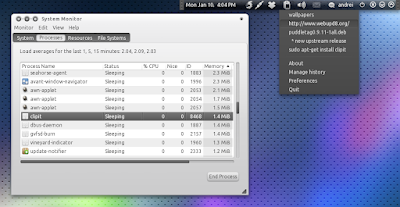
Parcellite doesn't have Ubuntu indicator support but for that you can use ClipIt, a Parcellite fork that uses an Ubuntu appindicator and also comes with some other fixes and improvements. The recent changes in Parcellite 0.9.3 have also been included in ClipIt.
To install ClipIt in Ubuntu, use the following commands:
sudo add-apt-repository ppa:shantzu/clipit
sudo apt-get update
sudo apt-get install clipit
Thanks to Vladi for both the Parcellite and ClipIt tips!


