Volutions - ID | News | Gadget | Tutorial | Freeware | Template | Etc.: icons
Showing posts with label icons. Show all posts

Faenza Icon Theme Updated With New LibreOffice, UbuntuOne Icons

Faenza Icon Theme

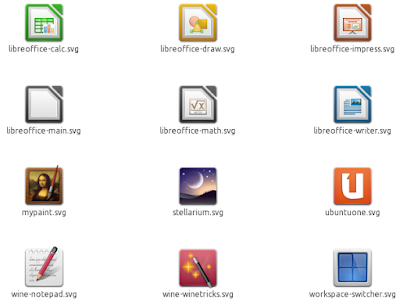
Faenza Icon Theme 0.9.2 has been released with new icons for LibreOffice, UbuntuOne - which now matches the new logo, a new workspace switcher icon and more.

With these, Faenza is almost ready for Unity (some icons are still missing though, like the Applications / Files & Folder Unity Places):

Faenza Ubuntu 11.04 Unity


Faenza 0.9.2 changelog:
  • New logos: Gentoo, Slackware
  • New actions: folder-move, folder-copy
  • New apps: libreoffice, workspace-switcher, wine notepad, winetricks, stellarium, mypaint
  • w mimetypes: application-pgp-keys, encrypted
  • New status icons: gsm 3G network, wireless secure network, bluetooth paired, weather icons in 24x24
  • Color or opacity changes for some status icons
  • A new design for Ubuntu One
  • A few new 16x16 applications icons


Install Faenza Icon theme in Ubuntu using the commands below:
sudo add-apt-repository ppa:tiheum/equinox
sudo apt-get update
sudo apt-get install faenza-icon-theme

Note: the versions in the PPA are a bit weird: the latest Faenza 0.9.2 has version "0.9-ubuntu3" but that's the latest version nevertheless.

If you don't use Ubuntu, get the latest Faenza Icon Theme 0.9.2 via Gnome Look.

Faenza 0.9.1 Released With Yet Another "Darker" Theme, Bug Fixes

Faenza

A new Faenza Icon theme version has just been released: 0.9.1. This is just a minor bug-fix release, but it does bring a new variant called "Faenza-Darker" which is great for dark themes (dark buttons / Gnome Panel) with a light toolbar.

That's pretty nice because now you don't have to manually tweak the default Faenza Icon theme or use unofficial variants if you just want to use the original Faenza but with various light/dark icon combinations.

Faenza-Darker is the third official "dark" Faenza, along with "Faenza-Dark" and "Faenza-Darkest". To understand the differences between them, take a look at the screenshots below (read the description in Gedit too):

Faenza Dark
(Faenza-Dark)

Faenza Darker
(Faenza-Darker)

Faenza Darkest
(Faenza Darkest)


Install the latest Faenza Icon Theme 0.9.1 (the PPA version says "0.9-ubuntu2" but that's 0.9.1) in Ubuntu using the following commands:
sudo add-apt-repository ppa:tiheum/equinox
sudo apt-get update
sudo apt-get install faenza-icon-theme

If you're not using Ubuntu, you can download Faenza via Gnome Look.

Download jDownloader Faenza Theme

jDownloader doesn't look too great and doesn't respect your GTK theme or icons. But luckily, if you use the Faenza icons, you can get jDownloader to use it (this is actually a jDownloader icon theme).

Here's a screenshot before and after applying the Faenza jDownloader theme:

jdownloader
(Before)

jdownloader Faenza
(After)

Yes, the UI is still not too pretty, but at least the icons look better.

To get Faenza icons for jDownloader, download the theme from Gnome Look, extract it, then copy the folder called "jd" to your ~/.jdownloader folder - this will overwrite some files so you may want to make a backup of the original "jd" file just in case.

Then, start jDownloader, head over to the Settings tab and under User Interface > Theme, select "Faenza" from the drop-down. You'll then have to restart jDownloader to see the new Faenza theme.

Download Faenza for jDownloader

[via LFFL.org]

Faenza Icon Theme 0.9 Released With A New "Darkest" Theme, New Chrome Icon, Lots More

Faenza Icon Theme

The beautiful Faenza Icon Theme was updated to version 0.9 today, bringing a new "darkest" theme with status and action icons in light grey.

Here's the complete Faenza Icon Theme 0.9 changelog:
  • A new "darkest" theme with status and actions icons both in light grey
  • A wide bunch of old and new devices and actions in all sizes
  • New applications: debian software center, deja-dup, dc++, dvdrip, GCStar, guake, haguichi, Me TV, meld, file manager, nautilus actions configuration tool, tvtime, xine, zim
  • New status icons for Cover Gloobus, Me TV, zim, guake, keepassx
  • Highlight borders have been modified for all squared icons in 22x22 and 24x24
  • All monochromes icons have been reworked for smoother contrast
  • A new design for most of actions in 32x32 and above
  • Some reworked icons for applications
  • Subtle change in folders colour
  • New Chrome icon
  • Some fixes


The new "Darkest" Faenza is basically the same as the unofficial Faenza Dark Icons (Edited), at least at a first glance:

Faenza Icon Theme


Install Faenza Icon Theme 0.9 in Ubuntu


Add the Faenza PPA and install the latest Faenza Icon Theme 0.9 in Ubuntu 9.10, 10.04 and 10.10 using the following commands:
sudo add-apt-repository ppa:tiheum/equinox
sudo apt-get update
sudo apt-get install faenza-icon-theme

You can also download Faenza Icon Theme via DeviantArt.

WebUpd8 Themes PPA: Updated Minty Freshness, New Additions: Divergence IV, Victory, Buuf

* To be able to install the themes in this post, you'll firstly have to add the WebUpd8 themes PPA using the following command:
sudo add-apt-repository ppa:webupd8team/themes && sudo apt-get update

If you've already added the WebUpd8 Ubuntu Themes PPA, make sure you run "sudo apt-get update" to be able to install the new packages / updates presented in this post.


Minty Freshness


Minty Freshness

Minty Freshness got an update, bringing an optional dark panel as well as many other improvements. Here's the complete changelog for the latest 0.6.5 version:
  • Panel improvements
  • Addition of a dark panel (replace 'include "Styles/panel.rc"' with 'include "Styles/panel-dark.rc"' in the gtkrc)
  • Nautilus elementary mode button redesigned
  • GtkScale slider is now round with all versions of murrine
  • Banshee toolbar fixes for newer versions (1.8 >=)
  • Banshee and synaptic button fixes now work for newer versions
  • GtkComboEntry no longer renders a grey line in the right side in non gtk applications
  • Scrollbars now have up and down arrows on non gtk applications
  • New style for statusbar on non gtk applications

Thanks to Skies Of Azel for the info!

To get a dark panel, press ALT + F2 and enter:
gksu gedit /usr/share/themes/Minty-Freshness/gtk-2.0/gtkrc


Then on line 371, replace:
include "Styles/panel.rc"
with:
include "Styles/panel-dark.rc"

Save the file, apply a different theme and then switch back to Minty Freshness to see the changes.


Install Minty Freshness from the WebUpd8 themes PPA using the following command (make sure you've added the PPA firstly as stated in the beginning of the post):
sudo apt-get install minty-freshness-theme


New themes in the WebUpd8 themes PPA


All the WoW themes (it's just one theme but it comes with quite a few variations) were uploaded soon after announcing the WebUpd8 themes PPA and today I've added more themes based on your suggestions:


Divergence IV: A New Hope


Divergence IV: A New Hope

* Divergence IV "A New Hope" - available for Ubuntu 10.10 and 11.04 only! Install the GTK theme using the following command:
sudo apt-get install divergence-iv-gtk-theme

There is also a package providing the Divergence IV Emerald decorations. Install it using:
sudo apt-get install divergence-iv-emerald-decorators

Once installed, you'll be able to tweak Divergence IV A New Hope GTK theme by going to System > Preferences > Divergence IV: A New Hope Settings Manager.


Victory GTK theme


Victory GTK theme

* Victory GTK theme - a very customizable theme - available for Ubuntu 10.04, 10.10 and 11.04. Install it using the following command:
sudo apt-get install victory-gtk-theme


Buuf Icon theme


Buuf icon themes

* Buuf icon theme - available for Ubuntu 10.04, 10.10 and 11.04. Install it using the following command:
sudo apt-get install buuf-icon-theme


Want a theme in the WebUpd8 Themes PPA? Suggest it in the comments!

Divergence IV: A New Hope, Victory and Buuf screenshot credits: their original authors (see links above).

LibreOffice Faenza Icons

LibreOffice Faenza icons

By default, Faenza uses the OpenOffice icons for LibreOffice. But if you're using LibreOffice, you may want some custom Faenza icons for it - there are no official icons yet but Funnyguy has created some beautiful Faenza Libreoffice icons which you can download via Gnome Look.

To install the icons, download the archive in your home folder, extract it and run the following commands:
cd
cd 138257-libreoffice-faenza-icons_V2
sudo ./lo-install

Download LibreOffice Faenza icons.

[image credits: Funnyguy]

Faenza Icon Theme 0.8 Brings Lots Of New Icons, Reworked Icons For Chrome, Firefox And More

Faenza icons 0.8

The well known Faenza Icon theme was updated today (version 0.8), bringing icons for some applications which were missing such as: adobe air, deadbeef, devede, devhelp, dia, facebook, flickr, frostwire, glade, gnucash, gnumeric, homebank, jdownloader, kupfer, netbeans, openbravo, openerp, openshot, phatch, picasa, qtcreator, radiotray, soundconverter, terminator, vim, wordpress, wxbanker, xbmc and xournal.

But that's not all. The latest Faenza 0.8 also brings reworked icons for Gwibber, Firefox, Chromium and Google Chrome, a whole new set of emblems and weather icons and new monochromatic icons for applications.


Ubuntu users can install Faenza Icon theme using a PPA (available for Ubuntu Karmic, Lucid and Maverick):

sudo add-apt-repository ppa:tiheum/equinox
sudo apt-get update
sudo apt-get install faenza-icon-theme


You can also install the folowing packages:

  • "faenza-icons-mono" to replace 22x22 squared icons for Deluge, Exaile, Fusion Icon, iBus and Kupfer by their monochromatic versions
  • "faenza-extras" or "faenza-dark-extras" to override some icons displayed in system tray by Faenza monochromatic ones. This affects Liferea, LastFM and RadioTray.


The same PPA also hosts the amazing Equinox themes.


If you're not using Ubuntu, you can download Faenza Icon Theme via Gnome-Look.

Oxygen wallpaper contest

Oxygen is the team behind the beautiful icon sets you will get to experience in KDE 4.0 when it is released sometime this year. The goal of Oxygen icon set is to create a set of icons for use on the desktop which are beautiful, support usability and accessibility and in a way, better fulfill the needs of the users.

The Oxygen team has announced a contest. Put your creativity to task and create a wallpaper. The wallpaper can be of jpg jpeg bmp gif png svg svgz formats. The theme for the wallpaper you create can be any of 3D art, vectors, photos, and pixmaps and it can be of any standard wallpaper dimension but bigger the better.

Fig: A sample set of Oxygen Icons

Once you have created the wallpaper, upload it to their website. If you are lucky and your wallpaper is selected, it will be included in the wallpapers that will ship as default set in KDE 4. More details here.
 
Support By Blogger