Volutions - ID | News | Gadget | Tutorial | Freeware | Template | Etc.: dockbarx
Showing posts with label dockbarx. Show all posts

Set DockBarX To Use Compiz Scale Plugin (Unity-Like)

DockBarX Compiz Scale

I don't know how many of you know this, but DockBarX has a cool feature that allows you to trigger the Compiz Scale plugin when clicking on a window group. This is the effect used in Unity that you've seen in many videos - well, it this was available in DockBarX for a long time.

That means that you can already use this Unity dock feature without Unity. Check out the video below:


To set DockBarX to use the Compiz Scale plugin for a window group, open the DockBarX Preference and on the "Group Button" tab, under "Select action options", for "Multiple windows open" select "Compiz scale".

If you also want an Expo shortcut like in the video, check out this post: Gnome Panel Icon For Triggering The Compiz Expo Plugin (Like In Unity). To add the Expo shortcut to AWN, add the "Simple Launcher" applet, then drag'n'drop the Expo icon (which you've created like in the post linked above) to it.


Post inspired by arzali @ Ubuntuforums.

DockBarX Applet 0.43 Released With Helpers, Media Buttons [PPA]

DockBarX 0.43

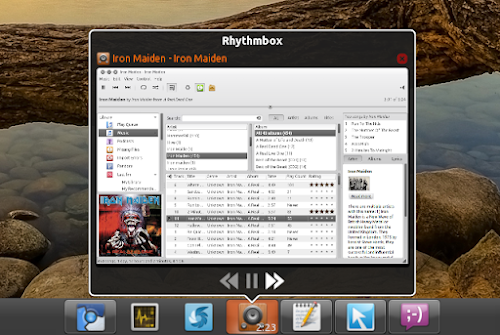
DockBarX, an amazing Gnome panel / Avant Window Navigator taskmanager applet was updated to version 0.43 today, this new release bringing media buttons for all music players that show up in the Ubuntu Sound menu and DockManager support which means that you can use the Docky helpers in DockBarX.

To enable the Helpers, in DockBarX Preference (Applications > Accessories), on the "Plugins" tab, enable "Use DockManager", then click on "Helpers" and enable some plugins. The media buttons are enabled by default but if you want to turn them off, uncheck "Use media buttons" on the Plugins tab.

DockBarX helpers


Other changes in DockBarX 0.43:
  • Prism applications are separated from each other instead of being grouped together now.
  • Small visual changes to window list and group menu. The look when using DockbarX without compositing is imporved a bit.
  • DockbarX uses its own log now. When reporting bugs, include the file ~/.dockbarx/log/dockbarx.log (or any other of the numbered log files in that directory depending on how many times you restarted dockbarx since the bug last occurred)

Here are some more screenshots featuring the latest DockBarX 0.43 used both with Avant Window Navigator and a regular Gnome panel:

DockBarX rhythmbox controls

DockBarX pidgin helper

DockBarX gnome panel

DockBarX gnome panel screenshot


Install DockBarX 0.43 in Ubuntu from the WebUpd8 PPA

DockBarX 0.43 is not yet available in the official DockBar PPA, but as usual we've uploaded the latest version to the WebUpd8 PPA (for Ubuntu Karmic, Lucid, Maverick and Natty). Add the WebUpd8 PPA and install DockBarX 0.43 using the following commands:
sudo add-apt-repository ppa:nilarimogard/webupd8
sudo apt-get update
sudo apt-get install dockbarx dockbarx-themes-extra
The above command will install both DockBarX and an extra themes package. If you want even more themes (and you use Avant Window Navigator / Faenza icons), see: DockBarX Theme Pack For Avant Window Navigator / Faenza Users.

To be able to use the Helpers, you also need to install the following packages:
sudo apt-get install dockmanager dockmanager-daemon libdesktop-agnostic-cfg-gconf libdesktop-agnostic-vfs-gio

For Zeitgeist support, add the Zeitgeist PPA and upgrade to the latest Zeitgeist:
sudo add-apt-repository ppa:zeitgeist/ppa
sudo apt-get update
sudo apt-get dist-upgrade

And finally, if you want to use DockBarX in Avant Window Navigator, you need to install the AWN DockBarX applet:
sudo apt-get install awn-applet-dockbarx


Tip: to be able to use the Window Previews feature, firstly enable it from DockBarX (Applications > Accessories > DockBarX Preference, on the Window List tab enable "Show previews") and then in CompizConfig Settings Manager make sure the "KDE Compatibility" plugin is enabled and that both options for this plugin (Support Plasma Thumbnails and Support Present Windows) are enabled.


If you're not using Ubuntu, you can download the latest DockBarX 0.43 via Gnome Look.

Report any bugs you may encounter @ Launchpad!

DockBarX 0.42 Brings Improved Window Previews

DockBarX 0.42

After the great new features it got two weeks ago, a new DockBarX version (0.42) has been released today, bringing some tweaks and improvements to those new features:
  • It's now possible to scroll through windows (by using mouse or keyboard shortcuts) without raising all of them.
  • Opacify now fades in and out.
  • If the previews takes up too much space to fit the screen, a list without previews will be shown instead.
  • The size of previews are now set in such a way that the window is shrunk until it fits a in box with the same size aspect ratio as the monitor (the size you set from preference window is the height of this box). Previously it was fitted into a square (size*size). This makes the height of the previews more even.
  • Vertical panels now stacks the previews vertically. The placement of the window list is set according to the golden ratio instead of aligning the top of the button and the window list.
  • For those of you who doesn't like the new menu: The old gtk menu is back and you can choose to use it from preference window.

Install DockBarX 0.42 in Ubuntu

DockBarX 0.42 is of course available in the WebUpd8 PPA for Karmic, Lucid, Maverick and Natty. Add the PPA and install DockBarX 0.42 using the following commands:

sudo add-apt-repository ppa:nilarimogard/webupd8
sudo apt-get update
sudo apt-get install dockbarx dockbarx-themes-extra

The last command above will install both DockBarX and the extra DockBarX themes pack. To also install the Avant Window Navigator DockBarX applet, use the following command:


sudo apt-get install awn-applet-dockbarx


If you're not using Ubuntu, download DockBarX via Gnome Look.

DockBarX Theme Pack For Avant Window Navigator / Faenza Users

DockBarX big dock

"DBX big dock" pack is a DockBarX theme package especially created for those that use DockBarX with Avant Window Navigator and comes with updated "Unite" themes (Unite_v and Unite_h) with new blink attenton effects as well as versions for these themes without backgrounds and bigger icons for Faenza icon theme users (the themes are called Faenza_Unite_v and Faenza_Unite_h). The pack also includes a mod of the DockBarX "dock" theme with nice colors and attention effects.

All the themes in the "DBX big dock" come with 2 versions: for horizontal and vertical dock.

DockBarX faenza
(DockBarX Faenza_Unite_H)


Installation

Download the "DBX big dock" pack from Gnome Look and extract it on your desktop, then run the following commands:
cd ~/Desktop/136409-Dock-pack/themes
sudo cp * /usr/share/dockbarx/themes/

Then, open the DockBarX preferences (Applications > Accessories) and try out the new themes!


See also: DockBarX 0.41 installation instructions (including extra themes and AWN applet)

DockBarX 0.41 Released With Redesigned Window Previews And Menu (Looks Amazing!)

DockBarX 0.41 has just been released, featuring redesigned window previews and menu as well as a close button for the window previews. Before more info on the latest DockBarX, here are some screenshots:

DockBarX 0.41 running in Avant Window Navigator
(DockBarX 0.41 running in Avant Window Navigator)

DockBarX 0.41 - Gnome Panel applet
(DockBarX 0.41 - Gnome Panel applet)

DockBarX 0.41 running in Avant Window Navigator
(DockBarX 0.41 running in Avant Window Navigator - recent items menu)


Matias Särs, the DockBarX developer notes:

In DockbarX 0.41 the looks of the window list and the group button menu change quite a bit. The reason for these changes is the changes that other parts of the linux desktop is going through. Previous versions of DockbarX were made to blend in with gnome 2 and ubuntu notifications. DockbarX 0.41 is made to look more like Untiy, gnome-shell and docks. The new look is also a result of the positive response BigRZA's mockup got a few months back. As you can see for yourselves I've followed it quite closely.


Install DockBarX 0.41 in Ubuntu

The DockBarX repository has not been updated yet, so as usual I've uploaded it to the WebUpd8 PPA (using the original packaging by T. Scott Barnes so many thanks to him!). To add the WebUpd8 PPA and install the latest DockBarX in Ubuntu Karmic, Lucid, Maverick and Natty, use the following commands:
sudo add-apt-repository ppa:nilarimogard/webupd8
sudo apt-get update
sudo apt-get install dockbarx dockbarx-themes-extra

To also install the Avant Window Navigator DockBarX applet:
sudo apt-get install awn-applet-dockbarx


Important: to use the window previews, you need CompizConfig Settings Manager (sudo apt-get install compizconfig-settings-manager) and then check the "KDE Compatibility" plugin in CCSM (System > Preferences > CompizConfig Settings Manager) - yes, even in GNOME. Once you enable this plugin, in DockBarX preferences (Applications > Accessories > DockBarX Preference), on the "Window List" tab, enable "Show Previews".

If you also want blur for the window previews and menu items, in CompizConfig Settings Manager enable the "Blur Windows" plugin, then on its settings, under "Blur filter" select "Gaussian". You can also want to tweak the "Gaussian Radius" or "Gaussian Strength" a bit (to whatever values you like).

DockBarX 0.40 Has Been Released

DockBarX

DockBarX 0.40 has been released last night, bringing the following changes:
  • The default theme has changed. The new default theme DBX is made by BigRZA. It's made to look good with Radiance and Ambiance. (The old default theme is still included under the name Old.)
  • Another theme by BigRZA, Sunny Colors is also included by default
  • The theme Human bar is removed since it was pretty much an older version of the new default theme.
  • Number of entries in recent and most used menus are increased to eight (for real this time).
  • A few new languages and updates to translations.


Dockbarx 0.40 new default theme
(The new default theme in DockBarX 0.40)


For those who are not familiar with DockBarX: it's a taskbar with grouping and group manipulation which works as an applet for both the GNOME Panel (see the images above) and Avant Window Navigator (image below):

DockBarX Avant Window Navigator


As usual, I've uploaded the latest DockBarX 0.40 in the WebUpd8 PPA, along with an updated extra themes package (it's required to upgrade to the latest dockbarx-themes-extra version if you've ever installed it or else you'll get an error when installing DockBarX) and the AWN applet. With this update, I've also uploaded packages for Ubuntu 11.04 Natty Narwhal (for all the DockBarX related packages).

To add the WebUpd8 PPA and install DockBarX and the extra themes, use the following commands:
sudo add-apt-repository ppa:nilarimogard/webupd8
sudo apt-get update
sudo apt-get install dockbarx dockbarx-themes-extra

To also install the Avant Window Navigator applet:
sudo apt-get install awn-applet-dockbarx
 
Support By Blogger