Volutions - ID | News | Gadget | Tutorial | Freeware | Template | Etc.: dropbox
Showing posts with label dropbox. Show all posts

Unity Launcher Icon To Share Files Using Dropbox [Drag'n'Drop]

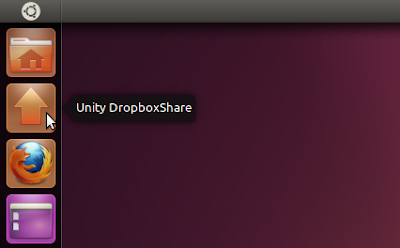
Unity Dropbox Share

After seeing a simple script on ubuntu.onego.ru to share files on Dropbox using an icon in the Unity launcher, I though I'd update the Dropbox Share script I've created a while back to do something similar, but more advanced: just like the regular Dropbox Share, you'll be able to share both files and folders and also you can share multiple files at once.


So Unity Dropbox Share was born, a simple drag'n'drop Dropbox share icon for the Unity launcher (it's just a script written in Bash). Here's a video with Unity Dropbox Share in action:


Even though this was created for the Unity launcher, it should probably work with other docks like Avant Window Navigator, Docky, DockBarX or Cairo Dock too (I've only tested it with AWN).


How it works:
  • The shared files do not take extra space on your computer since only a symbolic link is placed in your Dropbox public folder
  • It works with both files and folders (including multiple files and folders at once)
  • An emblem is placed on the files / folder you share and a NotifyOSD notification is displayed when the files you've shared have been uploaded to Dropbox.
  • Links to the files you share are automatically copied to your clipboard.
  • To unshare the files you need to remove the links from your Dropbox public folder (Or use Dropbox Share which also comes with an Unshare script) - I couldn't figure a way to do it from the icon.


Tip: if you remove some files you've shared from the Dropbox public folder, you can update the emblems by simply clicking the Unity Dropbox Share icon (you may need to refresh Nautilus using CTRL R).


Install Unity Dropbox Share


Unity Dropbox Share is available in the WebUpd8 PPA for Ubuntu 11.04 only. Add the PPA and install it using the commands below:
sudo add-apt-repository ppa:nilarimogard/webupd8
sudo apt-get update
sudo apt-get install unity-dropbox-share

The Unity Dropbox Share icon isn't automatically added to your Unity launcher (I couldn't figure for a way to do this - no, using Gsettings doesn't work as it can't be ran with "sudo") so you'll have to add it manually it: open Nautilus and navigate to /opt/unity-dropbox-share/, then drag and drop the icon to the Unity launcher.


If you have a suggestion / bug to report, let me know in the comments! You can also submit bugs @ Launchpad.


Credits for Dropbox Index which is used by Unity Dropbox Share: kosciak1.

Get The Dropbox AppIndicator To Work In Ubuntu 11.04 Natty Narwhal

Dropbox Ubuntu 11.04

Those of you that run Ubuntu 11.04 Natty Narwhal already probably know that the Dropbox application indicator doesn't work in Natty - not using the official Dropbox build.

But you can get the Dropbox AppIndicator to work in Ubuntu 11.04 Natty Narwhal by using the latest script below:


1. Install Dropbox the regular way - using the .deb provided on its download page.

2. Run the commands below:
cd
wget http://webupd8.googlecode.com/files/fixdropbox
chmod +x fixdropbox
./fixdropbox

What the script does is remove the Dropbox daemon files and prompts you to download it again, then modifies the Dropbox startup script to start with a delay of 20 seconds and then modifies it so that Dropbox doesn't change it automatically (dropbox automatically overwrites this file on each start without this tweak).

So when you log in, Dropbox will start with a 20 seconds delay! That's the only way to get the Dropbox AppIndicator to work in Ubuntu 11.04 with the latest Dropbox version. For now anyway. If it doesn't start after 20 seconds, you may want to add more seconds to the script so edit it:
gedit ~/.dropbox.sh

And modify the delay to a bigger value.


Post updated April 29, 2011.

Dropbox 1.0 Stable Released With Selective Sync, Huge Performance Enhancements, More [How To Upgrade To 1.0 In Ubuntu]

Dropbox 1.0 Ubuntu

Dropbox 1.0 (actually 1.0.10) has finally been released! The new stable version finally brings selective sync, Ubuntu appindicator, huge performance enhancements and hundreds of bugs fixed. These features were already present in the Dropbox experimental builds for quite some time but only now they've "graduated" into the stable Dropbox 1.0 version.

Performance enhancements - The client-side sync engine has been re-architected to optimize the response time and resource consumption. Dropbox 1.0 reduces the memory usage by 50%.


Selective Sync - you can now choose which folders to sync:

If you have a netbook or a computer with a tiny hard drive, syncing your entire Dropbox isn’t always a great idea. You also might not want certain files on your home computer to pop up on your work computer. Selective Sync solves these problems! You now can choose which folders get downloaded to which computers. This saves you time so you don’t have to sync stuff you don’t need.


Dropbox appindicator

Ubuntu AppIndicator - the Ubuntu version of Dropbox now comes with an AppIndicator which makes it consistent with the whole Ubuntu look. Further more, Dropbox now supports custom AppIndicator icons.


Upgrade to Dropbox 1.0 stable in Linux


To upgrade to the latest stable Dropbox in Ubuntu (and other Linux distributions), firstly close Dropbox, then run the following command:
mv ~/.dropbox-dist ~/.dropbox-dist.OLD
The above command will move the old Dropbox installation folder to ~/.dropbox-dist.OLD as a backup.

Then, simply run Dropbox from Applications > Internet > Dropbox - doing so, the latest stable Dropbox version will be automatically downloaded and installed (and your old settings won't be removed):

Dropbox


Thanks to Nicolas for the tip!

PPA Updates: Minitube, gThumb, Launchpad Getkeys, Dropbox Share

This post is just a short summary of some updated packages in the WebUpd8 PPAs.


Minitube


Minitube

Minitube stopped working yesterday due to some changes to the YouTube website. The update broke all applications for playing / downloading YouTube videos, but luckily Minitube has been updated (version 1.3) to include a fix. The new version also comes with a new icon and is available as always in the main WebUpd8 PPA, for Ubuntu Lucid and Maverick:
sudo add-apt-repository ppa:nilarimogard/webupd8
sudo apt-get update
sudo apt-get install minitube

Unfortunately this version also comes with a regression: the Linux version has lost its seeking functionality. Hopefully it will be re-added in a future version.


gThumb


I've also updated gThumb (2.12.1) which is now in sync with Debian unstable. This is not a new version of the application but a new version of the packaging which fixes some pretty important bugs. As usual, gThumb is available both in the WebUpd8 gThumb PPA and in the main WebUpd8 PPA.


Install it from the gThumb PPA:
sudo add-apt-repository ppa:webupd8team/gthumb
sudo apt-get update
sudo apt-get install gthumb


Launchpad Getkeys

Late last night I've updated Launchpad Getkeys to work with non-English Ubuntu. Initially, the script only worked if you had installed Ubuntu in English.

Install Launchpad Getkeys:
sudo add-apt-repository ppa:nilarimogard/webupd8
sudo apt-get update
sudo apt-get install launchpad-getkeys

Unfortunately the script does not work if you need a proxy.

Dropbox Share

Dropbox Share has been updated to use "dropbox-index.html" instead of "index.html" file name when sharing a folder (an .html file is created when sharing a folder so you can easily navigate all the subfolders in a web browser). The new version also removes these dropbox-index.html files automatically when unsharing a folder (and when the script notices you've removed the link from the Dropbox Public folder).

Install Dropbox Share:
sudo add-apt-repository ppa:nilarimogard/webupd8
sudo apt-get update
sudo apt-get install dropbox-share

Dropbox Share (Nautilus Script) 0.3, Released

Dropbox Share

Today I'm releasing a new version of the Dropbox Share Nautilus script. There's only one new feature in this version (which was asked in the comments of our previous Dropbox Share post): the emblems for the files you've previously shared and then manually removed from the Dropbox Public folder are now automatically removed when you perform a new share / unshare.

Here is an example: let's say you have files A and B on your desktop and you share them using Dropbox Share - in this case, an emblem (small Dropbox icon) is added to these files on your desktop so you know they have been shared. Then, if you right click file A on your desktop and select "Dropbox Unshare", the file is unshared and the emblem is removed, but if you remove file B from your Dropbox Public folder without using the Unshare script, file B on your desktop would still have the emblem. The new version released today fixes this in a semi-automatic way: now if you manually delete file B from your Dropbox Public folder, the next time you'll share on unshare a file using Dropbox Share, the emblems for all the files you've manually removed from the Dropbox Public folder will be removed.


If that doesn't make too much sense, just try out the latest Dropbox Share and you'll see what I mean.

To install the latest Dropbox Share 0.3 in Ubuntu, use the following commands:
sudo add-apt-repository ppa:nilarimogard/webupd8
sudo apt-get update
sudo apt-get install dropbox-share

If you spot a bug, report it @ Launchpad.

Dropbox Share 0.2.3 Gets Emblems For Shared Files And Folders [Nautilus Script]

Dropbox Share file emblems

Thanks to theradioboy's tip, I've implemented emblems for the shared files and folders in the latest Dropbox Share Nautilus script (v0.2.3).

Dropbox Share now automatically adds emblems to the files you've shared (even though these files are not in your Dropbox folder) and removes them when you unshare the files. Please note that you need to unshare the files via the Dropbox Unshare script (it's also included in Dropbox Share package - all you have to do is select the files you want to unshare, right click them and under "Scripts" you'll find both "Dropbox Share" and "Dropbox Unshare") or else the emblems won't be removed!

Because there is no way to refresh Nautilus by directly calling it via command line, I've used a "hackish" way to do it: the script will send "F5" to the window (just as if you've pressed it) which should instantly make the file emblems show up. If for some reason the emblems are not updated automatically, simply press F5.


Here is a video demoing the new emblems feature in Nautilus Share 0.2.3:


Install Dropbox Share in Ubuntu:
sudo add-apt-repository ppa:nilarimogard/webupd8
sudo apt-get update
sudo apt-get install dropbox-share


Dropbox Share is now available on Launchpad so you can easily submit bugs: https://launchpad.net/dropbox-share

Nautilus Dropbox Share Script, Now Available In An Ubuntu PPA

A while back I wrote a Nautilus script for easily sharing any file or folder using Dropbox, via right click. But scripts get lost, especially since most people do a clean Ubuntu install every 6 months. Also, I guess it's easier to simply install it from a PPA / .deb then having to manually install the dependencies and moving the script to the right folder and so on. For this reason, I've packaged my Dropbox Share script in a .deb and uploaded it to the main WebUpd8 PPA.

A little recap on what Dropbox Share does: using it, you can right click any file or folder (!) on your computer and share it via Dropbox. The script creates a link to the file / folder you want to share, in your Dropbox Public folder and automatically copies the link(s) to the clipboard so you can paste it in an email, IM window and so on.


Why using this script is better then copying some files in your Public Dropbox folder:
  • because the script uses symbolic links, the files aren't actually copied to your Dropbox public folder, so they won't take the double amount of space
  • all the links are automatically copied to the clipboard
  • you can even share folders, even though Dropbox doesn't allow this by default (the shared folder will have an "index.html" file and thus opening its link in a web browser, it can be easily accessed via a web browser)

But since explaining all this is wrather difficult, here's a video I've recorded back when I've released version 0.2:


Install Dropbox Share in Ubuntu

Before installing Dropbox Share, make sure you remove any previous versions of the script (both Dropbox Share and Dropbox Unshare) you may have in ~/.gnome2/nautilus-scripts:
rm ~/.gnome2/nautilus-scripts/"Dropbox Share"
rm ~/.gnome2/nautilus-scripts/"Dropbox UnShare"

Dropbox Share is available for Ubuntu Karmic, Lucid, Maverick and Natty, but has only been tested on Lucid and Maverick. To add the PPA and install Dropbox Share, use the following commands:
sudo add-apt-repository ppa:nilarimogard/webupd8
sudo apt-get update
sudo apt-get install dropbox-share


If you're not using Ubuntu, you can get the script from our previous post: Share Any File Or Folder With Dropbox Via Right Click (Nautilus Script) - New Version


The .deb package also comes with the Dropbox Unshare script - thanks to Nicolargo. Credits for Dropbox Index which is used by Dropbox Share: kosciak1.


And since this is a post about Dropbox, here's a tip for you: you can grab up to 768 MB free dropbox space through social media connections - click HERE (don't worry, I don't win anything if you click that link).
 
Support By Blogger